
Forums › Forums › K6 Dashcam › Consistent SD Corruption
Tagged: faulty
-
Consistent SD Corruption
Posted by lukec on 2025-06-20 at 23:03This is most frustrating, I’m burning through SD cards at a rate of knots with this to the point I wish I never purchased it now.
I’ve purchased the recommended cards in a variety of makes and capacities and finding that they corrupt sometimes within days, sometimes within weeks or months depending on how big the capacity is for the card.
Anyone else had this issue? I’ve worked through all the trouble shooting, checked the adaptor is fitted security to prevent moisture ingress etc etc etc but at the point of ripping the lot out.
I’ve recently put in a SanDisk MaxEndurance 64GB MicroSDxc U3 class10 card which lasted all of 2 weeks before the rapid flashing red light comes on the unit
Prior to that I used a SanDisk 128gb Extreme MicroSDxc U3 A2 which lasted 3 months before corrupting. Prior to this I had a SanDisk MaxEndurance MicroSDxc 128gb which lasted a year and also been through a few Lexar versions of the same all amounting to a year and a 9 months of use and a total of 6 memory cards.
The camera unit is connected via a thunderbox which provides some power for a few seconds after turning the bike off. I’ve checked all connections, and they are all as they should be
Frostie replied 1 year, 2 months ago 4 Members · 14 Replies -
14 Replies
-

Hi Luke,
What setting did you use for ‘Loop Recording’?
And how do you format the SD cards?How did you connect the yellow wire? Did you also connect the red and black wires to the Thunderbox? These are also switched by the Thunderbox?
-

Hi Hans, thanks for your reply. I’m keen to get this sorted as it’s become annoying and unnecessarily expensive to have it now.
Loop Recording is set to continuous overwrite. I format the SD cards from within the app but I’ve also tried formatting via my windows PC to FAT format too.
I don’t have a yellow wire in my K6 dash cam (it was one of the first production ones ordered the moment they released in the UK, not sure if that makes a difference). I have a white wire as an extra but don’t use that as per the manual.
Red and black wires are connected to the relevant ports on the thunderbox and the thunderbox manages the power to the K6. Hope that helps
Power to the unit seems good, but I get the rapid red flashing light whenever one card breaks.
-
This reply was modified 1 year, 4 months ago by lukec.
-
This reply was modified 1 year, 4 months ago by
-
-
Hi Luke,
It is recommended to only format the SD cards using the Innovv app. An SD card formatted with a computer can sometimes cause problems. Innovv cameras sometimes cannot handle an SD card formatted by a computer.
I suspect that the white wire is the same as the yellow wire. So the switch wire. You should use this. If the K6 is switched off suddenly because the voltage on the red and black wires drops, this will certainly cause problems. The current recording cannot be closed properly and the SD card can also become corrupted.
-
Forgive me I just went and checked – the Yellow wire is there, it’s connected into the port as the Red wire terminals on my thunderbox
I’ve formatted one Lexar card using the PC as I wanted to try it bearing in mind every other time I format is via the Innov app
-
-
Hi Luke,
I think I see the source of the problem.
You have the yellow wire connected to the red wire. And that is a ‘no-go’ and the ultimate recipe for problems.
The red and black wires should be connected to a constant plus and minus. The yellow wire should be connected to a switched power supply.
-
I thought the thunderbox is designed to effectively a bit switched connector hence the set up… Can I put the yellow wire into another one of the green/black thunderbox terminals then? Or do I have to feed it somewhere else entirely?
Btw I appreciate your help with this
-
-
Hi Luke,
I am not familiar with systems like the Thunderbox, ezCan and such. But it seems to me that you can set the Thunderbox to switch in some way. The fact remains that the Innovv cameras need a constant and a switched power supply. Therefore never connect the yellow and red wire together.
You could connect the K6 directly to your battery and let the yellow wire switch through the Thunderbox.-
I’ve got some crimps coming tomorrow to connect the wire to a connector for the battery terminal to give that a go as a back up. I’ve separated the red and yellow wires into their own blocks in the green output of the thunderbox (according to feedback online) and this does sort it – although it appears my rear camera is dead, even though all connections seem fine. Going to check in a week as it may just have been the fact I formatted the card but on “live view” I had a blank black screen for the rear camera
-
-
Hi Luke,
You could remove the rear camera and reinstall it. Maybe it was a loose/dirty contact.
Possibly also reload the firmware. It could be that the firmware has also become corrupted due to all the malfunctions, causing the rear camera to no longer work.
Also make sure that the cables are not too tight. Due to the vibration of the bike, tightly tensioned cables can also become defective.-
Still looking into the loss of the rear camera but directly connected the positive to the battery, leaving the negative and the yellow connected to the thunderbox.
I came back to the bike overnight to ride in to work to find it had seemingly been on all night with my trickle charger plugged into my bike (as I do every night). Is there a way to stop this happening?
I’ve almost defeated the point of having thunderbox as it’s designed to regulate the power through lots of devices through the bike (and my dash cam was the only thing I had using it as scottoiler didn’t behave well with it and three of those went faulty!).
Checked the wiring connections and that all seems fine. Want to avoid the flashing the firmware as I’m worried I’ll break it even more
-
-
Hi Luke,
I think the trickle charger has activated the Thunderbox somehow.
Why not also connect the – directly to the battery?
The K6 requires minimum current when it is switched off, so you don’t have to worry about draining the battery.
If you have connected the – to the battery and you hold the yellow wire against the + of the battery and the K6 starts up well, works well and if you disconnect the yellow wire from the + of the battery and the K6 switches off well, then you know that the K6 is working well. You should then look for the problem with the Thunderbox.
In general, the experiences with Thunderboxes, exCan here on this forum are not positive.
As for the firmware update, you can (almost) not break anything. Use an 8 to 32Gb SD card for the update. And if it doesn’t work, you can always perform the firmware update again. -
M2 NVMe SSD’s are now dirt cheap and do not corrupt as easily as the SD cards to. If there were an NVMe M2 adapter available for storage that would make this K6 camera world leading. I would buy the adapter in a heart beat.
I bet for people in the know this would not be too hard to make. I say it is a simple SD card to M2 NVMe interface but still over my head. I just use them. I dont make them.
People have already thought of this and are working on this. Some products are for sale already.
The SD card is not going to last much longer. Even on phones. Already there are M2 NVMe drives in 2230 size which is the size of a 50 pence piece in the UK. Within a decade NVMe drives that hold 100’s of TB will be the size of todays SD cards.
The SD card standard is already being expanded as well to the SD Express.
Innov should be ahead of the game not behind it with SD cards. Make an adapter for M2 NVMe’s for your cameras.
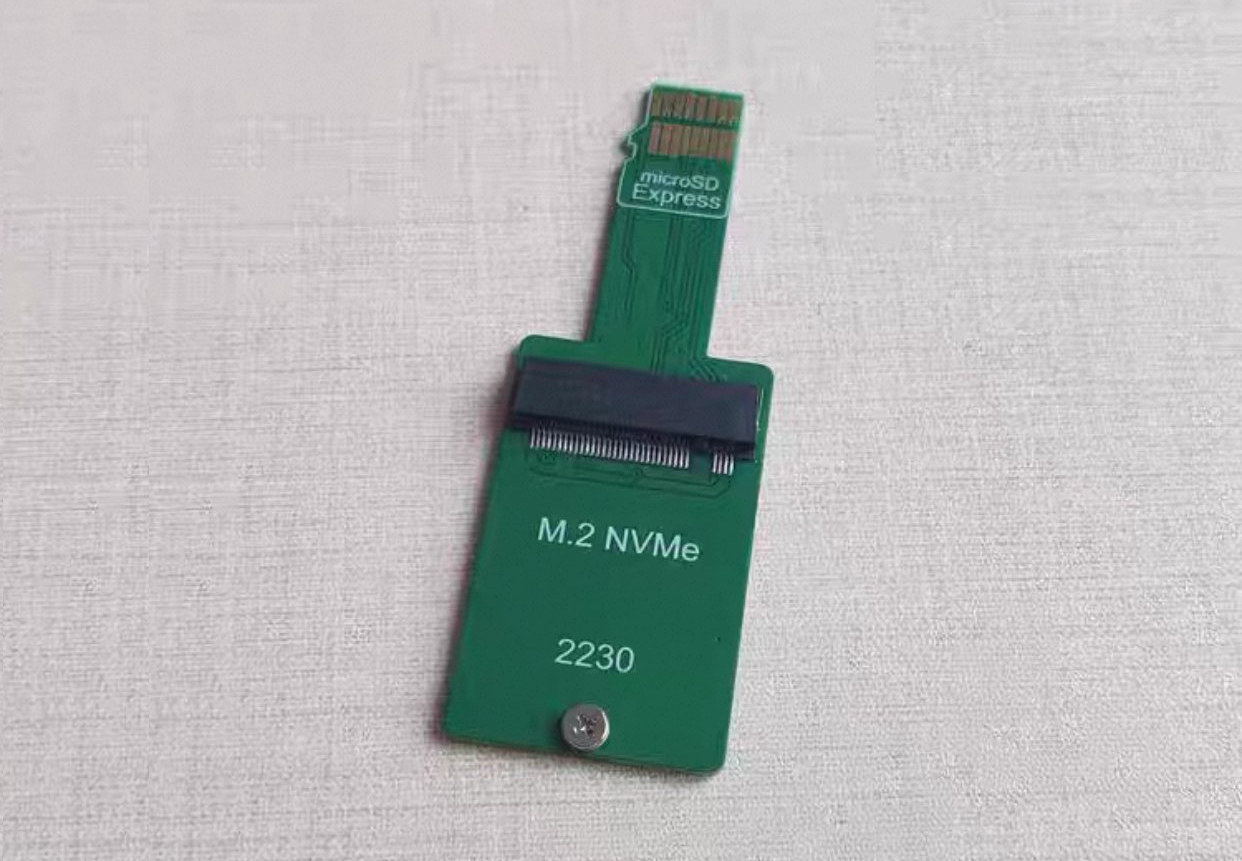
cnx-software.com
Adapter allows users to connect an M.2 NVMe SSD to a microSD Express card slot - CNX Software
NVNT has designed a microSD Express to M.2 NVMe adapter (SDEX2M2) for the Nintendo Switch 2 or other devices supporting microSD Express cards
-

> In general, the experiences with Thunderboxes, exCan here on this forum are not positive.
I can’t agree with that. I’ve connected my K3 with an EzCan and it works without any problems.
The reason why cour SD cards gets corrupted all the time is quite simple. As you connected the yellow and the red wire both to the same power source, you did not give the K6 time to shut down properly when the ignition is switched off. Means the K6 was still writing to the SD card when you cut off power. If this happens when the K6 is currently refreshing the FAT on the file system, it gets corrupted.
The yellow cable simply “tells” the K6 whether it should start (Ignition is on) or should shut down (ignition switch from on to off).
That’s why the manual says that red an black has to be connected directly to the battery, while the yellow cable needs switched power. This way the K6 always has power to shut down properly. The shutdown takes around 10-15 seconds.
You COULD use tools like Thunderbox or EzCan, but then YOU have to make sure, that the K6 gets power for at least 20 sek after the voltages has dropped at the yellow cable.
At EzCan, for example, you can configure this in the software. I don’t know whether the Thunderbox can do the same.
Regards,
Marc
Log in to reply.