


Hans
Forum Replies Created
-

Hi Gordon,
Thanks for the feedback.
Have fun with your K5. -
Hi Chris,
Are you playing the videos on your phone, or are you doing this on a computer?
Can you play recorded videos directly from the camera? So, from “Camera Files”? And does this also work if you download the videos first and then try to play them from “Local Files”?
It’s possible that your phone doesn’t have the correct codecs required to play the videos.
Are you playing the videos on your phone, or are you doing this on a computer?
And what if you switch formats, i.e., between TS or MP4? If this solves the problem, then your phone definitely doesn’t have the correct codecs. Try installing VLC (Videolabs); the correct codecs are usually installed that way.
Have you tried it with a different phone, preferably a different make/model? -
Hi Shiz,
I understand your problem. If you place a cover under the camera, there’s also a chance it will be visible.
One thing to be aware of with an extension arm is that it can amplify vibrations from your bicycle. It’ll be a matter of experimenting with the type of bracket and where you’ll mount it on your bike.
I’m very curious about your solution. Other K6 users might also benefit. So if your neighbor has made something that works, we’d like to see the photos and share your experiences. -
Hi Ma,
Isn’t a folder created with a name like ‘protected’ or something similar? Because EMR recordings are generally those made when the G-sensor is activated, not when the button is pressed.
Have you tried formatting the SD card with the Innovv app and then recording a protected video?
Sometimes an SD card read from a computer can no longer be properly handled by an Innovv camera. Only when the SD card is formatted using the Innovv app does everything work properly again. -
Hi Eric,
Thanks for the feedback.
Good to hear the problem is now resolved.
Enjoy your K5! -
Hi Stephen,
Parking mode can work when the ignition is off.
The yellow wire should no longer have power, and the red and black wires must still have power. The power supply must be at least 12.5V, otherwise parking mode will be disabled.
Parking mode is different from accident recording. Both use the built-in G-sensor. -
Hi Michel,
Good to hear the K5 is working again.
Have fun with your K5! -
Hi Tommy,
In Dashcam Viewer, you can see your driving location on a map.
You can also see your speed using color coding.
You can also simultaneously see the corresponding video feed from the front and rear cameras. -
Hi Chris,
Did you format the SD card using the Innovv app?
Sometimes an Innovv camera can have some difficulty handling the SD card when it’s read on a PC. Does the SD card meet the Innovv specifications?
Could it be that a connector isn’t properly connected, causing the video to temporarily stop recording?
Is the power supply working properly? Can you tell when it’s not recording? For example, are you signaling, using the horn, or something similar? This is to rule out a power supply issue. -
Hi Tommy,
To view the GPS data and videos, you can use Dashcam Viewer, https://dashcamviewer.com. The free version offers many possibilities.
If you want to edit videos, use Kdenlive, https://kdenlive.org. This is a free program that allows you to edit (almost) professionally.
You can use the SD card on your computer to download the files. -
Hi Chris,
How do you watch the videos? Directly from the camera, or did you download them first?
Have you tried different settings (resolution/bitrate)?
Is there a 10-second gap during playback, or is there a 10-second gap when you view the files themselves on your computer? -
Hi Edge,
I mounted the N1 on the right handlebar. I operate it with my right hand.
I temporarily attached the cameras to the K3’s cameras, this is because it was not for final installation but only for testing.
I had to install an extension on the handlebar to attach the N1. I ordered this on AlieExpress.com
The Torx screw in the handlebar that needed to be loosened was secured securely with Locktite. But I eventually managed to loosen it with force and patience. Here are a few photos of my N1 setup.Good luck with the installation and have fun with your N1!

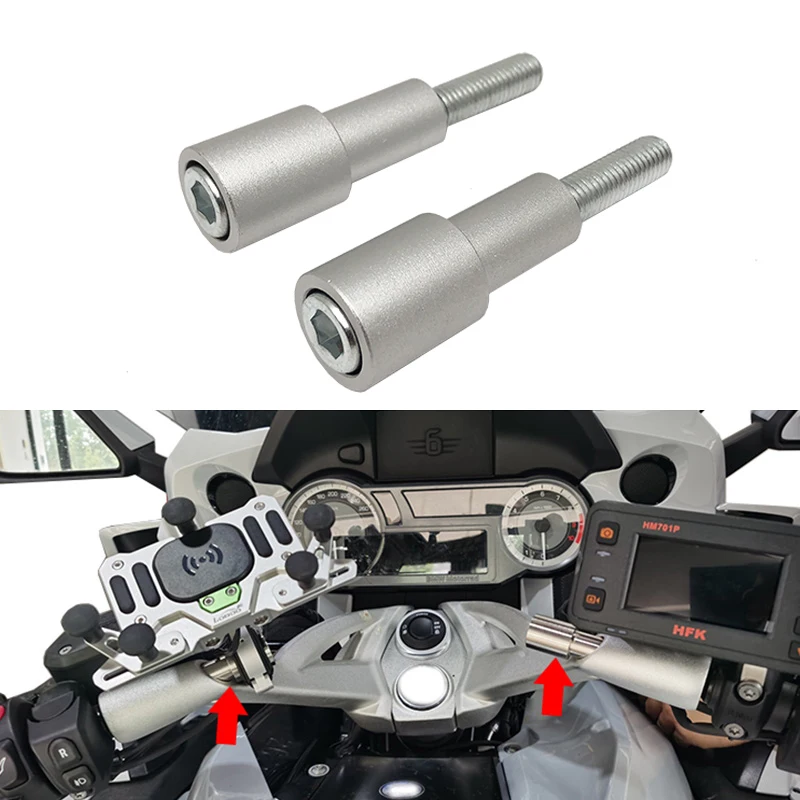
nl.aliexpress.com
Smarter Shopping, Better Living! Aliexpress.com
-
Hi Tommy,
I don’t have a K7 myself, so I can’t find out the exact folder names.
But it will probably be something like:– protected.
Content:EMR_E– video.
Content:Movie_E– photo.
Content:Photo_E -
Hi Karl,
Good to hear that a simple adjustment solved the heat problem.
Enjoy your K7!